Understanding USB Standards: A Deep Dive into Types and Speeds
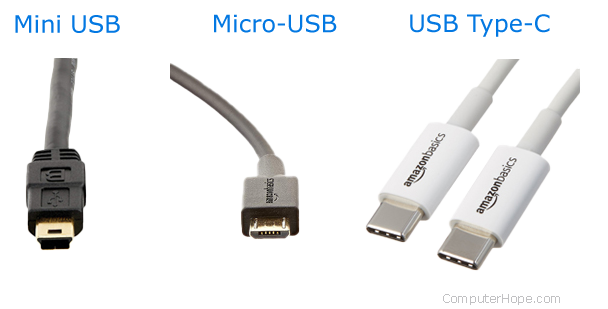
Understanding USB standards is crucial for anyone who uses electronic devices, as they dictate how these devices communicate and transfer data. The USB (Universal Serial Bus) standard has evolved significantly since its inception in the mid-1990s, leading to various types that cater to different use cases. Broadly, the types are categorized as USB-A, USB-B, USB-C, and Micro USB. Each type offers unique features and applications—USB-C, for example, is rapidly becoming the universal connector due to its reversible design and ability to transfer power and data simultaneously.
The speed of USB connections has also seen significant advancements. Initially, USB 1.1 offered a data transfer rate of 1.5 Mbps, while USB 2.0 increased that to 480 Mbps. With the introduction of USB 3.0, the speed jumped to 5 Gbps, and further enhancements brought us USB 3.1, boasting speeds up to 10 Gbps, and USB 3.2, which can reach 20 Gbps under optimal conditions. In addition, USB4 can offer even higher throughput rates and better performance with compatible devices. Understanding these types and speeds is essential for maximizing the capabilities of your devices and ensuring compatibility with the latest technologies.
If you're looking to expand your connectivity options, check out the Top 10 Powered USB Hubs available on the market. These hubs not only provide additional ports but also ensure your devices receive adequate power, making them ideal for charging multiple devices simultaneously. With various designs and specifications, you're sure to find a hub that fits your needs perfectly.
How USB Revolutionized Data Transfer: The Journey of Your Favorite Gadget
The introduction of USB (Universal Serial Bus) in the mid-1990s marked a significant turning point in how we connect our devices and transfer data. Prior to USB, data transfer methods were often cumbersome and required specific connections for each device. With the advent of USB, a universal standard emerged, allowing users to connect a myriad of devices—from keyboards and mice to external hard drives and smartphones—using the same interface. This not only simplified the process of linking devices but also enhanced data transfer speeds, making the experience seamless and efficient.
Over the years, USB technology has continually evolved, introducing faster versions such as USB 2.0, USB 3.0, and the latest USB-C. Each iteration has delivered improved data transfer rates, increased power supply capabilities, and enhanced compatibility with a wide range of gadgets. Today, USB ports are ubiquitous, found in everything from laptops to televisions, and they serve as a crucial link in our daily digital interactions. As we look back at the journey of our favorite gadgets, it’s clear that USB has revolutionized data transfer, making it more accessible and user-friendly than ever before.
What Happens Inside Your USB Port? Uncovering the Technology Behind the Connection
Understanding what happens inside your USB port is crucial for grasping how digital devices communicate. At its core, the Universal Serial Bus (USB) is designed to facilitate the transfer of data and power between computers and peripherals. When you plug in a device, a series of electrical signals initiate a handshake process, which confirms the compatibility of connected devices. This interaction includes establishing power levels and data transmission protocols necessary for efficient communication.
The anatomy of a USB port comprises various components, including the connector, the controller, and the protocol engine. Each of these elements plays a vital role in ensuring smooth operations. For instance, the controller manages the data flow while converting signals from the device into usable information for the computer. Additionally, USB types (such as USB-A, USB-B, and USB-C) designate different shapes and functionalities, enhancing versatility and performance across a range of devices from smartphones to laptops.